Posts

All Paths Down on Esxi/HPE setups

So we ran into an issue where a clients server(VM running on esxi 6.0) just went offline. We logged in and found an All Paths Down situations but the datastore and all hardware was still alive and kicking. Turns out HPE is already aware of the issue and will send a replacement part at no charge and overnight. There is a USB sd adaptor plugged into the motherboard that is actually at fault. Read here: https://support.hpe.com/hpsc/doc/public/display?docId=emr_na-c05369827 On an HPE ProLiant server running VMware ESXi and utilizing an HP Dual 8GB microSD Enterprise Midline USB Kit, the HPE microSD card carrier solution may experience memory corruption, which may lead to an all paths down situation. 

Adding Dell drivers to MDT

Image
1: Log onto MDT as domain admin. 2: Open chrome and go to http://en.community.dell.com/techcenter/enterprise-client/w/wiki/2065.dell-command-deploy-driver-packs-for-enterprise-client-os-deployment 3: Find your model in the list and click the appropriate version. They are broken down by Windows version as evidenced by screenshot below. 4: After you click the cab link it will take you to a page like in the screenshot below. Just click download now on the link icon circled and save to your downloads folder. 5: After it downloads, extract it into your downloads folder. 6: Open up Deployment Workbench from the start menu. 7: Expand out Deployment Shares by click the arrow to the left. If you do not have any Deployment Shares under it then right click Deployment Shares and click Open Deployment Share. It is located at C:\DeploymentShare 8: Right click the MDT Deployment Share and select properties. a. Copy the following lines to the bottom and change the model to b...

Adding Windows 10 to MDT

Image
1. Download the latest Windows 10 ISO      a. Go to https://www.microsoft.com/en-gb/software-download/windows10 and click Download Tool Now.      b. Follow the on-screen prompts to download an ISO/Image.      c. Extract the ISO file Install.esd to the root of the C Drive. It can be found under F:\Sources\Install.esd if you mounted the iso under the MDT server OS. 2. Converting the .esd to a readable .wim for MDT      a. Open C:\ESD2WIM-WIM2ESD-v2 and run the script in there as administrator. (https://drive.google.com/open?id=1-8UFJdpXZvY8_LAfKlLUPpih3tqhkHaH )      b. It will ask for the full path. Just put in C:\install.esd and hit enter      c. Select Option 3 for Export Selected Index and hit enter      d. Select the option for Windows 10 Pro (usually 6) and hit enter      e. It will start exporting a install.wim which is what MDT will recognize as ...

Uninstalling Old Office and Lync in one swoop

Image
Currently, we are in the process of migrating all users to Office 365 ProPlus. However, manually uninstalling lync and office can be a pain. An easier way to do this is to: Create a folder and make two separate xml files named lync.xml and proplus.xml. Put this folder in a publicly accessible share somewhere. In the lync.xml put in the following: <Configuration Product="LYNCENTRY"> <Display Level="None" AcceptEULA="TRUE" /> <Setting Id="SETUP_REBOOT" Value="NEVER" /> </Configuration> In the proplus.xml put in <Configuration Product="ProPlus"> <Display Level="none" CompletionNotice="no" SuppressModal="yes" AcceptEula="yes" /> <Setting Id="SETUP_REBOOT" Value="NEVER" /> </Configuration> Next, create a batch file named nuke.bat or whatever fancy thing you want to name it. Paste in the following: ...

Old Bike Pics from the first wreck.

Image
It was a hot morning in August 2015. I opted to not wear my jacket or gloves but I did wear my helmet, boots, and jeans. As I was exiting Interstate 20 by the West Loop 250 entrance, the truck in front of me had no tail lights working and had slammed on his brakes to avoid hitting someone who ran the yield sign on the service road. Going from 75 down to a dead stop on a bike isn't too hard, but throw in a slick patch on the road, and a semi who blew past me as I exited onto the off ramp at the same time and my bike immediately started to slide. I aimed for the caliche and the next thing I knew I was on my back looking up. Out of the peripherals to the left I saw my bike bouncing end over end and I barely had enough time to scream "F**K!" as the tail end slammed onto my helmet and the bike stood on it's end on my head. A pair of safety glasses were the only thing that saved my skull from getting brained by whatever piece of metal to which I can only assume was the pas...

Got hit..again

Image
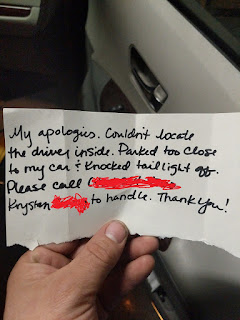
So I was eating at a local restaurant on Wednesday the 28th and had parked my bike in front of the main doors. I came out to leave after a bit and noticed my rear blinker(Driver side) on my dest with a folded note. I was horrified as I looked down and saw where this chick has hit my bike. Now, in case y'all didn't know I had wrecked this same bike at 60-ish MPH 2 years ago and barely walked away with my life(Ill post pics later). Insurance wants to total my bike it seems as it isn't worth much being an 03 VTX 1300s with 30k miles......But I will keep y'all updated. Oh and the best part? She isn't answering or returning any calls to me or the insurance on the contact info left. Edit** So the Insurance company finally called back and said they tracked her down. She admitted to hitting my bike and just leaving and not returning nay of mine or my insurance agents calls. Her insurance will be repairing my bike or totaling it depending on how much ...

Chrome tip

Image
Don't you guys hate it when you get that pesky https:// cert error in Chrome? Next time just click anywhere in the white and type in badidea Chrome thinks its a badidea to continue so they put in a bit of sarcasm and wit into the system.